
Is Your Charging Port Broken… Or Just Dirty?
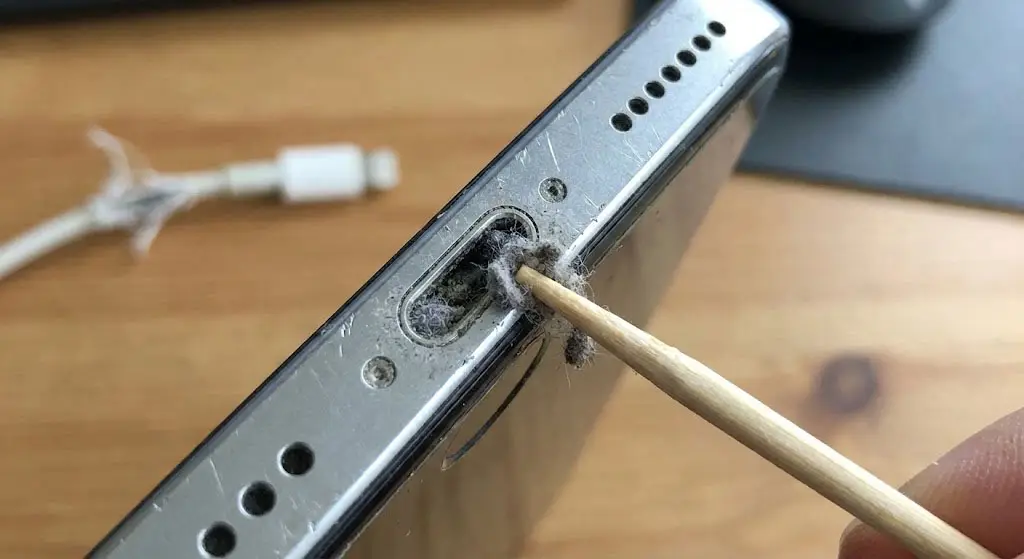
Does this sound familiar? You plug your phone in, but it doesn’t charge unless you wiggle the cable or hold it at a specific angle. You might think your charging port is broken, but the solution might be free.The “Pocket Lint” Problem Every time you put your phone in your pocket, the charging port acts like a tiny shovel, scooping up lint and dust. Over months, this packs down into a hard layer at the bottom of the port. Eventually, your charger can’t click in all the way.
How to Check Safely:Grab a flashlight and shine it into the port.Do you see a wall of grey fuzz at the bottom?Warning: Do not use a metal pin (you can short out the pins). Use a wooden toothpick or a plastic pick to gently scrape the lint out.Still not charging? If the port is clean but it still won’t charge, the internal pins are likely damaged. We can solder a new port in about 30 minutes.⚡
Stop struggling with your cable. Visit us for a port repair!